Changes Made Once
A promotion or transfer updates the record that every other module reads.
Every Employee Change, Made Once
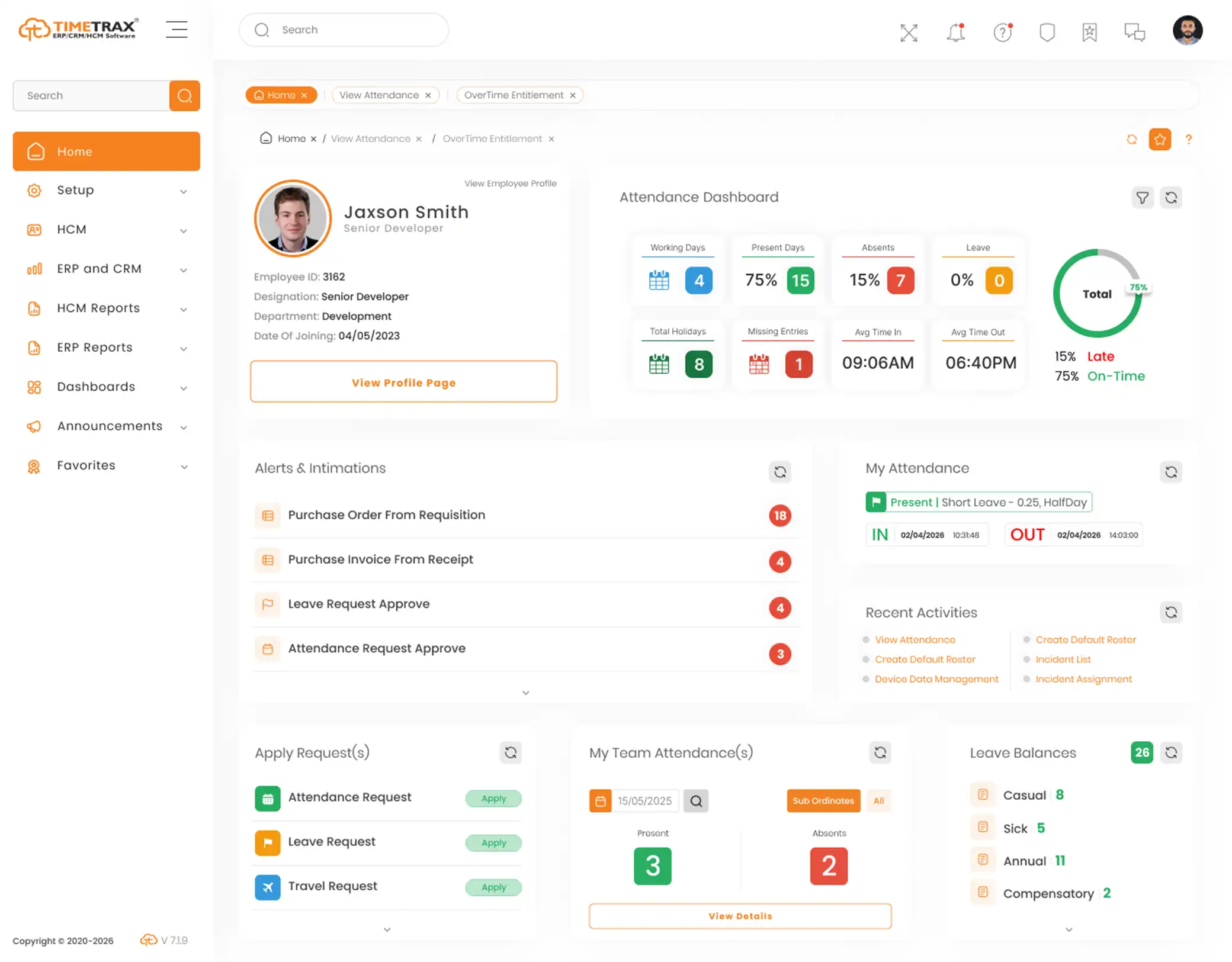
HR management software is where the HR team’s week actually goes: new joiners, transfers, requests, queries and exits. TimeTrax runs each of them as a workflow against one employee record, so a change is entered once and everything downstream sees it.
Trusted by 500+ Active Organizations across Multiple Industries
30th Year of Excellence
1 Million+ Employees Managed
Enterprise-Grade Security
Cloud & On-Premise Deployment
HR management software is the system an HR team uses to run the employee lifecycle — bringing people in, recording every change while they are employed, answering their requests and seeing them out at the end. An HR management system is the same thing under its other name. Where HR software names the category, HR management software names the work: the joiners, movers and leavers that fill an HR department’s week.
The practical test is what happens to a change. When someone is promoted, transferred or resigns, does one entry update the record, the approval trail and the payroll that depends on it — or does HR make the same change in three places and hope they agree? HR management software earns its keep by making each change once. TimeTrax does that on one platform, so the record, the workflow and payroll all read from the same place.
One HR system for the team’s work, from an employee’s first day to their last.
A promotion or transfer updates the record that every other module reads.
Requests follow the organization structure held in the system, with a trail of who approved what.
HR questions arrive as tracked tickets instead of calls and corridor conversations.
Clearances run in parallel, and the final settlement is calculated from payroll.
New joiners keyed into the HR system, the payroll file and the access list on day one
Promotions and transfers updated in the record but not in payroll
Employee queries arriving by phone, email and chat with no owner
Policy announcements lost in an inbox nobody re-reads
Exit clearances chased by hand while the final settlement waits
No record of who approved a change, or when
The stages of the employee lifecycle an HR team runs, on one platform.
Hire into the employee record rather than retyping a candidate on day one.
Employment details and every change to them, held on one record.
Departments, locations and reporting lines that approvals follow.
Employee queries raised as tickets, routed and tracked to resolution.
Company and policy notices published to staff from one place.
Resignations, clearances, exit interviews and the final settlement.
Most HR teams are not short of HR software. They are short of one HR system where a change only has to be made once.
For buying teams comparing options, this checklist of hr management system features is a useful pre-demo scorecard.
In a small team where HR knows everyone by name, this genuinely works, and it costs nothing. It fails when the person who knows how it all fits together is away or leaves — the process was in their head, not in the system.
A hiring tool, a records tool and a ticketing tool can each be the strongest in its field. The cost is the joins: the new joiner retyped from one into the next, and the exit that never reaches the system that should have withdrawn access.
TimeTrax runs the lifecycle on one platform, so a change made at any stage is the change every other stage reads. Worth it only if several stages are actually in scope; for a single problem a point tool is the cheaper answer, and we will say so.
Whether you’re replacing manual processes or upgrading from a legacy system, TimeTrax provides the technology, expertise and support to help you succeed.
Manage large workforces, multiple shifts, overtime, attendance, leave and payroll with greater accuracy while improving operational efficiency.
Support distributed teams across multiple branches with centralized employee management, real-time tracking and streamlined HR processes.
Simplify workforce scheduling, credential management, shift planning and compliance while ensuring uninterrupted healthcare operations.
Manage faculty, administrative staff and support teams through a centralized HR platform with automated attendance, leave and payroll.
Track employees across warehouses, distribution centers and field operations while improving workforce visibility and productivity.
Handle complex workforce structures, production shifts, attendance and payroll efficiently across factories and manufacturing units.
Create a modern employee experience with digital HR processes, self-service, performance management and workforce analytics.
Manage shift rotations, seasonal staffing, attendance, leave and payroll while delivering a seamless experience for employees and HR teams.
Connect HR processes with the systems your business already relies on.





From initial planning to post-go-live support, our specialists work closely with your team to configure the system around your business processes, migrate existing data and ensure a smooth transition.
We understand your specific business requirements to recommend the best implementation approach.
Our team configures workflows, policies, user roles and integrations to align the platform with your existing operations.
Employee records and historical data are securely migrated, followed by thorough testing to ensure everything works as expected.
We train HR teams, managers and employees before launching the system, backed by continuous support for a successful rollout.
Walk us through what happens in your team when someone joins, moves or leaves, and we will show you the same lifecycle on one employee record.
HR management software, HR management system and human resource management software name the same thing, and the full phrase is usually written by someone thinking about the HR team’s workload rather than about a product category. The useful distinctions are with the neighbours: HR software is the umbrella category, an HRIS is the record that lifecycle changes are written to, an HRMS is the attendance-to-payroll chain that reads those changes, and HCM software adds hiring, development and workforce planning on top. TimeTrax is sold at the widest of those, so the lifecycle described here and the layers around it run on the same platform.
The stages of the lifecycle have pages of their own: Recruitment Software, Personnel Management, Help Desk Management and Separation Management.
Everything you need to know about HR management software and how TimeTrax runs it.
HR management software is the system an HR team uses to run the employee lifecycle: bringing people in, recording every change while they are employed, handling their requests and queries, and managing their exit. An HR management system is the same thing under another name.
By name, yes - HRMS is the acronym for human resource management system. In practice the acronym is mostly used for the process stack of attendance, leave and payroll, while buyers who write the phrase out are usually describing the HR team's day-to-day administration. TimeTrax covers both on one platform.
HR software is the umbrella for any system that manages people rather than products. HR management software is the part of it that runs the HR team's administration of the lifecycle. A payroll-only tool is HR software, but it does not manage a joiner or a leaver.
Usually the change that currently has to be made in more than one place - commonly a new joiner or a transfer that HR enters in the record and again in payroll. Fixing that pair removes the most rework soonest.
Yes. TimeTrax offers self-service on the web and on kiosk terminals, and HR queries can be raised as help-desk tickets that are routed to the right team and tracked to resolution.
Through separation management. The resignation and notice period are recorded, clearance tasks go to IT, finance, admin and HR in parallel, and the final settlement is calculated from payroll once they close.
Yes, and on-premise as well. The deployment choice does not change which modules are available.
It depends on which stages of the lifecycle are in scope and how clean the existing employee data is - data cleanup is usually the long pole, not configuration. The TimeTrax team scopes this before implementation rather than quoting a figure blind.
An HR team is judged in the busy weeks — the intake, the restructure, the resignation nobody planned for. Those weeks are shorter when every change lands once and reaches everything that depends on it.