Reads Across Modules
Combine HR, finance and operations data in one view.
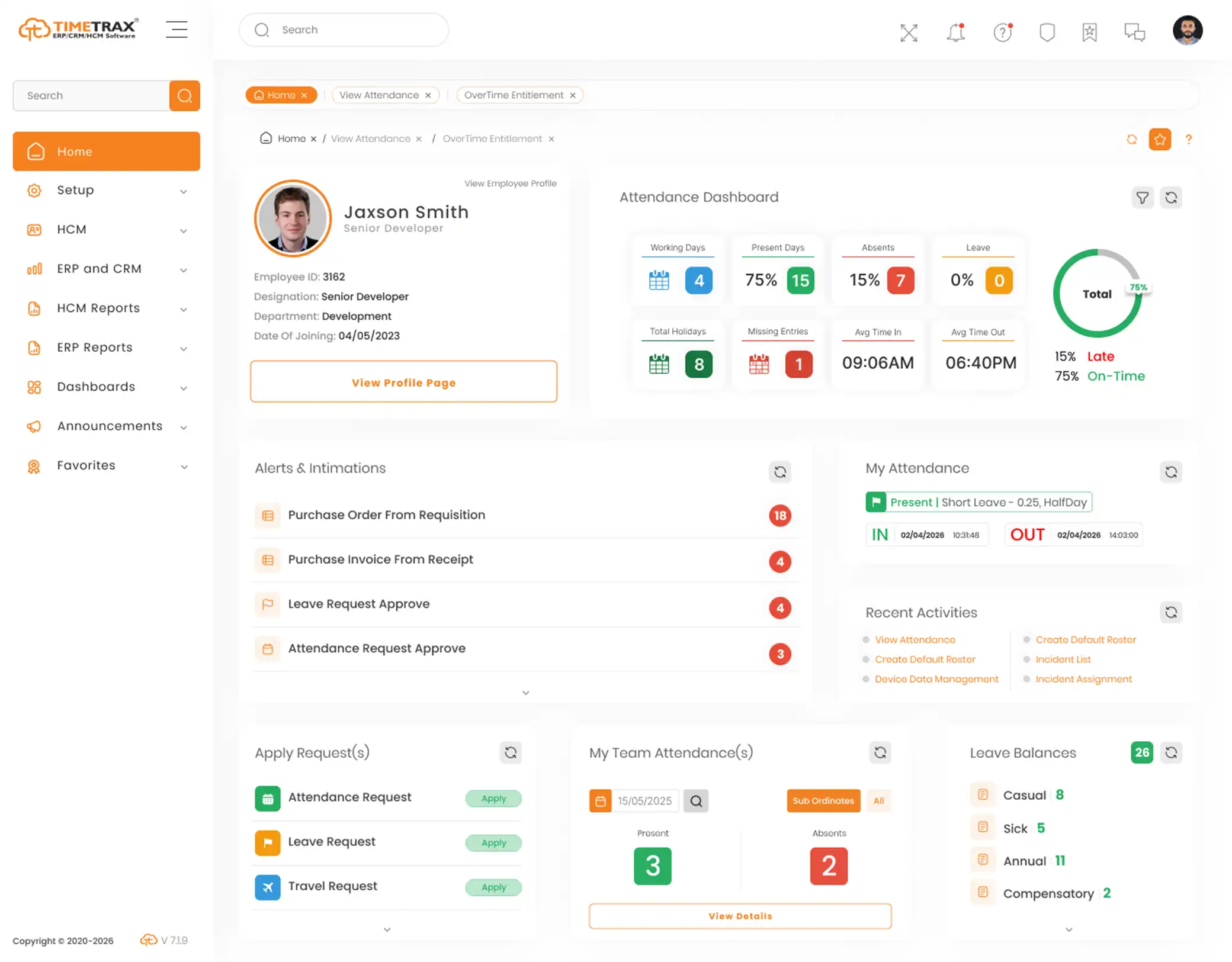
Answer Your Own Questions Without Exporting Anything
TimeTrax Online Reporting & BI Tool lets people build dashboards and reports from data already held across HR, finance and operations — so a question that spans two modules is answered in one place.
Trusted by 500+ Active Organizations across Multiple Industries
30th Year of Excellence
1 Million+ Employees Managed
Enterprise-Grade Security
Cloud & On-Premise Deployment
An online reporting and BI tool lets people build their own reports and dashboards from data the system already holds, instead of requesting an export. Because it reads across modules — HR, finance, inventory, sales — a question that spans two of them can be answered in one place rather than reconciled by hand in a spreadsheet.
It is deliberately broader than a single module’s reporting. Where HR Reports and Dashboards answers workforce questions, this reads across the whole suite, which is what makes cost-per-head or spend-against-department a single query rather than two exports.
Put the question and the data in the same place.
Combine HR, finance and operations data in one view.
Let people build their own views without queuing for IT.
Report on live records instead of an export that ages instantly.
Watch the measures that matter without rebuilding them monthly.
Every question answered by another spreadsheet export
Numbers that disagree depending on who pulled them
Reports that are already out of date when they arrive
Cross-module questions nobody can answer quickly
Reporting bottlenecked behind a single analyst
Dashboards rebuilt by hand every month
Self-service reporting over data the suite already holds.
Build reports against live records without writing queries.
Assemble the measures a role actually needs to watch.
Move from a summary figure to the records behind it.
Bring HR, finance and operations into a single view.
Send reports to the people who need them on a schedule.
Show each viewer only the data they are entitled to see.
Reporting problems look alike and are not. What you should buy depends on where the answer currently gets stuck.
Flexible, familiar and free, and it genuinely works for occasional questions. The failure is version drift: two people export on different days, both are confident, and the meeting is spent reconciling rather than deciding.
The most powerful option, and the right one if you are combining several systems. Be honest about the cost: it needs a data pipeline, a model and somebody to own it. Bought without that, it becomes an expensive export.
TimeTrax reports on the data already in the suite, so there is no pipeline to maintain and no second copy to drift. The limit is the honest one: it reports on what the suite holds, so data living elsewhere still needs the platform above.
Whether you’re replacing manual processes or upgrading from a legacy system, TimeTrax provides the technology, expertise and support to help you succeed.
Manage large workforces, multiple shifts, overtime, attendance, leave and payroll with greater accuracy while improving operational efficiency.
Support distributed teams across multiple branches with centralized employee management, real-time tracking and streamlined HR processes.
Simplify workforce scheduling, credential management, shift planning and compliance while ensuring uninterrupted healthcare operations.
Manage faculty, administrative staff and support teams through a centralized HR platform with automated attendance, leave and payroll.
Track employees across warehouses, distribution centers and field operations while improving workforce visibility and productivity.
Handle complex workforce structures, production shifts, attendance and payroll efficiently across factories and manufacturing units.
Create a modern employee experience with digital HR processes, self-service, performance management and workforce analytics.
Manage shift rotations, seasonal staffing, attendance, leave and payroll while delivering a seamless experience for employees and HR teams.
Connect HR processes with the systems your business already relies on.





From initial planning to post-go-live support, our specialists work closely with your team to configure the system around your business processes, migrate existing data and ensure a smooth transition.
We understand your specific business requirements to recommend the best implementation approach.
Our team configures workflows, policies, user roles and integrations to align the platform with your existing operations.
Employee records and historical data are securely migrated, followed by thorough testing to ensure everything works as expected.
We train HR teams, managers and employees before launching the system, backed by continuous support for a successful rollout.
Give people a way to build the view they need from live data, and spend meetings deciding rather than reconciling.
The naming here is loose and it hides a real difference in scope. An online reporting tool and self-service reporting software usually mean the same thing: letting people build their own views. Business intelligence software and a BI tool often imply something larger, combining several source systems through a pipeline. Business analytics software is used for both. The distinction that matters is whether the tool reports on one system of record or unifies many, because that decides whether you also need somebody to own a data model. Within one suite it belongs with the ERP software that already holds the records.
It shares its data most closely with HR Reports and Dashboards, Financials Management and Cost Management.
Everything you need to know about the TimeTrax Online Reporting & BI Tool.
It lets people build reports and dashboards from data the system already holds, rather than requesting an export. Because it reads across modules, questions that span HR and finance can be answered in one place.
That module answers workforce questions within HR. This one reads across the whole suite, which is what makes a measure like cost per head or spend by department a single query instead of two exports reconciled by hand.
The module is built for self-service, so business users can assemble the views they need. How far that goes before technical help is needed depends on the question, and is worth walking through with the TimeTrax team.
Yes. Scheduled distribution sends reports to the people who need them, which is usually what stops a dashboard being rebuilt by hand each month.
Role-based access governs what each viewer can see, so reporting does not become a route around the permissions set elsewhere in the system.
Not in every case. It reports on the data held in the suite with no pipeline to maintain. If you need to combine several separate source systems, a dedicated platform with a data model behind it is still the right tool.
It reports against the records in the system rather than a static export, which is the difference that stops two people arriving with different numbers.
TimeTrax is offered in both cloud and on-premise deployments, and this module follows the deployment chosen for the suite.
When the report and the record are the same thing, the number stops being something to argue about and starts being something to act on.